Site Dashboard
The site dashboard gives you an overview of all pools at your commercial site.
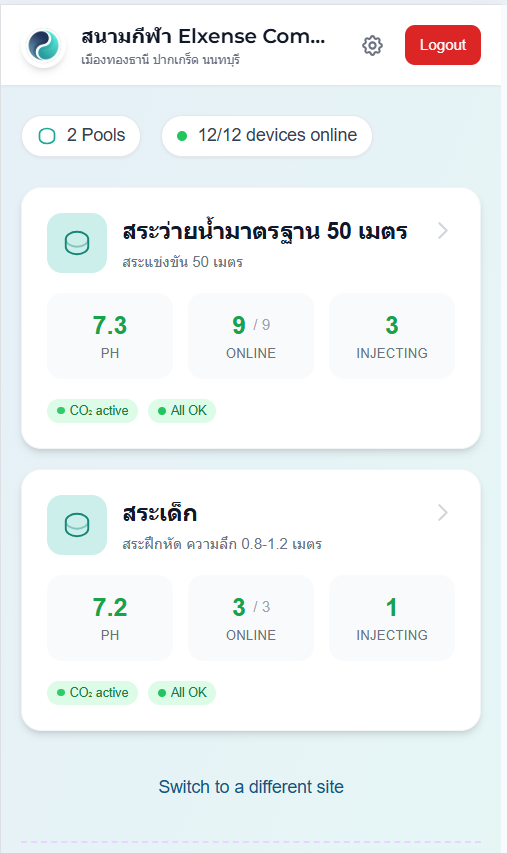
Header
At the top of the page you will see:
- Site name and address
- Live status badge — "Live" (green) when connected, or "Connecting..." (yellow) while establishing connection
- Settings button (⚙️) — opens Site Settings (owners only)
- Switch view button — returns to the Select View page
- Logout button
Site Summary
Below the header, a summary row shows:
- Total pools at the site
- Devices online count
Pool Cards
Each pool at your site is displayed as a card. Tap any pool card to open the Pool Monitoring page.
What each pool card shows:
- Pool name and notes (if any)
- Status badges:
- 🟢 All OK — all devices healthy and online
- 🔴 Offline — one or more devices offline
- 🟡 pH warning — pH is outside the normal range
- 🟢 CO₂ active — CO₂ is currently being injected (with pulsing indicator)
For pools with multiple device groups:
- Each group is shown as a row with:
- Group name with color indicator
- Master pH reading
- Online device count (e.g. 3/4 online)
- Number of devices currently injecting CO₂
For pools with a single group:
- Three key metrics are displayed directly: pH value, online device count, and injecting count